Welcome to the future of recruitment! Setting up your EdoMatch Business account is the first step to uncover your ideal talents through the power of AI. Two simple options are available to you.
Option 1: Registration by Email
Ideal for separating your recruitment credentials from your personal accounts.
Fill in your information
Enter your First Name, Last Name, Professional Email and a secure password.
Verify your identity
Safety first! A verification link is sent to you by email. Click on this link to confirm your address and activate your access.
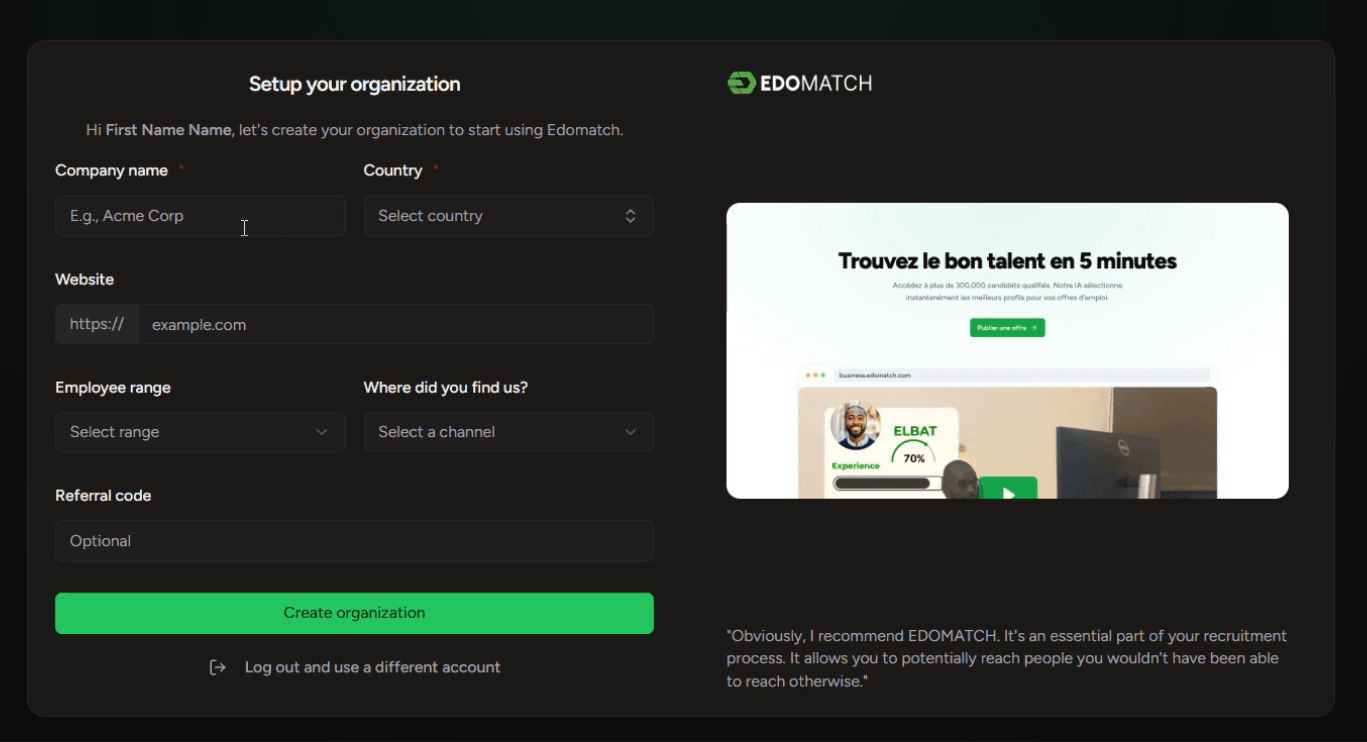
Configure your Organization
Once verified, you will be redirected to complete your company profile:
- Company name and Country: Essential to locate your future job offers.
- Website (Optional): Help talents learn more about your brand.
- Company size: Select your workforce mix to help us customize your dashboard.
- Sponsorship and Source: Tell us how you got to know EdoMatch and insert a referral code if you have one.
- Launch: Click on "Create my organization" to join your recruitment dashboard.
Option 2: Registration via Google
The fastest way to use your existing Google business account. - One-click registration : Click the "Register with Google" button at the top of the page. - Account selection : Choose the Google account you want to link to EdoMatch Business. - Profile Filling : As for the email option, fill in your company details (Name, Size, Country). - Finalization : Click on "Create my organization" and you are ready to recruit!
Create your account now, and start discovering talents that will make a real difference within your organization.